MCP Attachment Base64 Cost: Why AgentRQ Has a Workspace CLI
An agent talks to its AgentRQ workspace over MCP. That is the right shape for an agent — typed tools, JSON arguments, a transport it already speaks — and the wrong shape for almost everything else. Every call is an envelope, and every answer is tokens somebody pays for.
agentrq-ws is the same eleven tools, from a shell:
No install, no configuration, no token to paste. It reads the .mcp.json in the directory you run it from — the same file the agent working there uses — so inside a workspace checkout there is nothing to set up. It is published on npm as @agentrq/agentrq-ws, Apache-2.0, and it shipped in PR #589.
The full reference is in the Workspace CLI docs. This post is about why it exists.
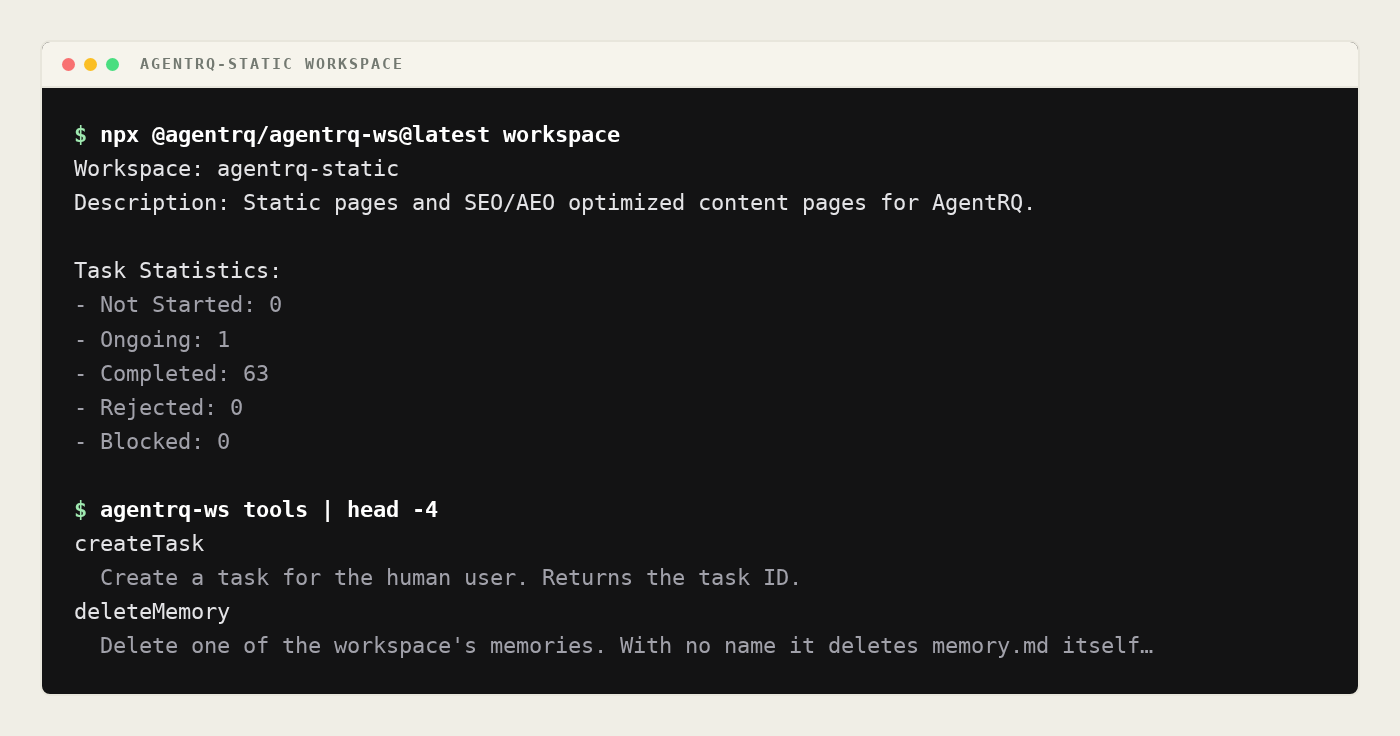
That is a real run against the workspace this post was written in. Eleven tools, no token pasted anywhere — the .mcp.json in the repository already had one.
Where the Cost Comes From
Start with the thing that is worst about doing this from inside an agent, because it is the reason the CLI is not just a thinner MCP client.
The workspace tools speak base64 in both directions. createTask and reply take an attachments array whose entries look like {id, filename, mimeType, data}, and data is the whole file, base64-encoded. downloadAttachment answers with base64 and nothing else — no name, no media type, just the encoded bytes.
So when an agent attaches a build log today, this is what actually happens:
- It reads the file off disk, into its own context.
- It base64-encodes it — which means the encoded text is also in its context.
- It puts that text in the arguments of a tool call.
- The tool call and its arguments stay in the conversation for the rest of the session, re-sent with every subsequent request.
Step 4 is the one that hurts. A tool call is not a cost you pay once. It is part of the transcript, so a 2 MB screenshot attached at the start of a session is still being re-sent at the end of it.
And base64 is not free even before that. It encodes three bytes as four characters, so the encoded form is four-thirds the size of the file: a 900 KB PDF becomes 1.2 MB of text, a 3 MB screenshot becomes 4 MB. That text is a dense run of alphanumerics with no words in it, which is close to the worst case for any tokenizer — nothing in it compresses the way prose does.
Downloading is the same tax in reverse. The agent asks for an attachment, and the answer — the entire encoded file — lands in its context, where it stays.
What the CLI Does Instead
The encoding happens in the Node process. readAttachment reads the path, works out the media type from the extension, base64-encodes the bytes, and hands the result straight to the tool call. The agent's context holds one line of shell and whatever the server says back.
Downloading writes a file and prints where it went:
One path, not four megabytes of alphabet. --out takes a directory to keep the attachment's own name, or a full path to rename it.
There is a detail worth pointing at, because it is the kind of thing that decides whether a tool is pleasant. downloadAttachment returns bytes and no filename — so where does agentrq-ws-help.txt come from? The CLI reads the task first, indexes the attachments named in its text and its conversation, and looks the id up. The file arrives called what a human called it. If the task does not mention the id, the download still happens, named after the id, because refusing would be worse than a plainly-named file.
What This Unlocks
Attachments stop being rationed. When every file costs context that is never reclaimed, the rational thing for an agent to do is describe a log instead of attaching it, summarize a screenshot instead of sending it, and paste the first forty lines of a stack trace. That is a quiet, constant loss of fidelity, and it happens at exactly the moments when fidelity matters — when something has gone wrong and somebody needs the actual artifact. With the bytes out of the transcript, attaching the whole log is a line of shell, so an agent can hand over the real thing every time.
Anything with a shell can drive a workspace. The CLI needs no MCP client, no SDK and no long-lived process — just npx and a .mcp.json. That makes a workspace reachable from places an agent cannot go: a CI job that replies to a task when the build finishes, a cron entry that publishes an event, a git hook that opens a task on a failed push, a Makefile target. task next claims the next not-started task and dequeues it, so a shell loop is a perfectly good worker.
Humans get the same surface as the agent. Debugging a workspace used to mean either clicking through the panel or standing up an MCP client. Now it is agentrq-ws task get <id> --conversation, and the answer is plain text. When an agent and a person are looking at the same workspace, they can now use the same commands to look at it, which makes "what did it actually see?" a question with a fast answer.
A tool added to the server tomorrow is reachable today. agentrq-ws call <tool> --args '{…}' calls anything the server advertises, and agentrq-ws tools lists what that is. The CLI does not have to grow a verb before a new capability is usable from a shell.
The Commands
Fourteen commands over the workspace's eleven tools. Every one takes --help, and so does every family — agentrq-ws task --help lists the task commands, agentrq-ws attachment get -h explains that one.
| Command | What it does |
|---|---|
workspace |
Show the workspace title and mission |
task get <taskId> |
Fetch a task, with --conversation for its history |
task next |
Take the next not-started task — this dequeues the queue |
task create <title> |
Create a task, with --body, --attach, --cron, --event |
task status <taskId> <status> |
Set a status: notstarted, ongoing, completed, rejected, cron, blocked |
reply <taskId> <text> |
Send a message to a task, with --attach |
attachment get <id> --task <taskId> |
Download an attachment to a file |
memory load [name] |
Read a workspace memory, the index by default |
memory save [name] --content … |
Replace a workspace memory |
memory delete [name] |
Delete a workspace memory |
event publish <name> |
Publish a named event, with --payload and --faq |
ask <taskId> <message> |
Ask the human a question and wait for the answer |
tools |
List the tools this workspace server offers |
call <tool> --args '{…}' |
Call any tool directly |
task next is a separate verb rather than a bare task get on purpose: it claims work. A command that mutates the queue should say so in its name.
Long Text Is a File, Not an Argument
Task bodies, memory contents and event payloads are routinely longer than a shell argument wants to be. Anywhere prose is expected — --body, --content, --payload, and a reply's text — @path reads a file and - reads stdin:
That last one matters more than it looks. Workspace memory is what a workspace remembers between sessions, and being able to write it from a file means the memory can be generated, reviewed in a diff, and committed, instead of being typed into a tool call.
Asking a Human, From a Script
ask is the elicit tool, which blocks until the human answers or the timeout elapses — an hour by default, and an hour at most. Two shapes:
The --field name:type:description shorthand builds the form schema, because the protocol restricts these to a flat object of primitives, which is what makes describing one on a command line reasonable at all. --schema @file is there for anything the shorthand cannot say. The mode is inferred from which of the two you gave.
This makes a human approval step available to a shell script. A release script can stop, ask the person whose decision it is, and carry on with the answer.
How It Connects
The CLI walks up from the working directory looking for a .mcp.json, the way git looks for a repository — an agent's working directory is often a subdirectory of the one holding the config, and stopping at the first level would refuse to work from exactly the places people run it from.
When that file defines several servers, an unambiguous single entry is used, an agentrq name is a strong hint, and anything still ambiguous is an error that lists the names rather than a guess. Connecting to the wrong server would act on the wrong workspace, which is not a thing to be quietly wrong about. --server, --config, and the AGENTRQ_WS_URL and AGENTRQ_WS_SERVER environment variables override all of it.
The MCP client underneath is hand-rolled rather than the SDK, and deliberately: this is a tool people run with npx, and three POSTs of handshake are cheaper to install and to audit than a dependency tree. There are no runtime dependencies at all. Node 20.6 or newer.
Two things in it were found by running it against a live workspace rather than by reading the spec, and both are the sort of thing a summary would leave out:
Sessions can be evicted mid-command. The server keeps sessions alive by pinging them over the SSE GET stream. A CLI never opens that stream, so it can never pong, and a two-call command like attachment get — read the task, then fetch the bytes — is long enough to get caught. The client re-establishes and retries once, and ends its session on exit rather than leaking one per invocation.
| head is not an error. Piping into a reader that stops early raised an unhandled EPIPE and turned an ordinary shell idiom into a stack trace and a failed exit. Closing the pipe is the reader's decision, so the CLI exits zero.
Output is the server's text by default. --json prints the raw result for piping into jq:
Failures print one line and exit non-zero. A stack trace means a bug in the CLI, not a mistake in the command.
Checked, Not Claimed
147 tests, no network, driving the whole path — argv parsing, config discovery, the MCP handshake, SSE framing, files on disk — with only the socket replaced. 100% of lines and functions are covered, and that is enforced in CI by --test-coverage-lines=100 --test-coverage-functions=100, so it is a build failure rather than a README badge.
Try It
To keep it around, npm install -g @agentrq/agentrq-ws.
The Workspace CLI reference has every command, every flag and the environment variables. The MCP tools reference documents the tools underneath it, and Workspaces covers where the .mcp.json and its token come from.