Your Agents Keep Forgetting. Now the Workspace Remembers.
On Wednesday your agent was about to cut a production release while settlement retries were still draining. You caught it. You explained: drain first, always, because a release mid-drain leaves duplicate charge attempts that somebody reconciles by hand on a Saturday. The agent understood immediately, fixed the plan, shipped it clean, and thanked you for the context.
On Thursday you opened a new task. A fresh agent picked it up and went straight for the release.
It wasn't being stupid. It simply never knew. Everything it learned on Wednesday died the moment that task closed — and you were the only backup.
That is the loop most people running agents are quietly stuck in. Not the agent's reasoning. The fact that nothing it learns survives the session, so the same context gets re-typed by a human, over and over, forever.
Where Your Agent's Memory Actually Lived
The usual answer is a file. CLAUDE.md. AGENTS.md. GEMINI.md. .cursorrules. You write down the deploy gate, the flaky tests, the person to page, and the agent reads it at startup.
That works, right up until it doesn't — and it fails in three ways at once.
It lives on one machine. The file is on your laptop. The agent running on the office box doesn't have it. Neither does the one your teammate started, or the one triggered by a schedule at 3am while nobody's watching. You know things your other agents can't.
It's shaped like one vendor. Every agent expects its own filename in its own dialect. Switch from Claude to Gemini because Gemini is better at this particular job, and you start from zero — not because the knowledge changed, but because it was filed under a name the new agent has never heard of. The thing you wrote down was never about Claude. It was about your work. It should not evaporate because you changed tools.
You can't see it. A file you wrote is one thing, but you have no idea what any given agent actually carries into a task. The first time you learn what it thinks it knows is when it acts on it — which is exactly the wrong moment.
So the knowledge fragments. Some in a file on one machine, some in a mission description, some in a Slack thread from March, and a lot of it in your head, where it gets re-typed on demand. Every new agent starts at zero, and the cost of running more agents grows with the number of agents rather than shrinking.
The Workspace Remembers Now
Memory has moved to where the work already lives: the workspace.
An agent connected to an AgentRQ workspace gets two tools — loadMemory and saveMemory. It reads what previous agents wrote down, and writes what the next one should know. The notes belong to the workspace, not to the agent that happened to write them, so every agent working there reads and writes the same set.
They're also not optional-by-obscurity. The instructions every connecting agent receives now end with a step telling it to load the memory before asking you something you may have already answered.
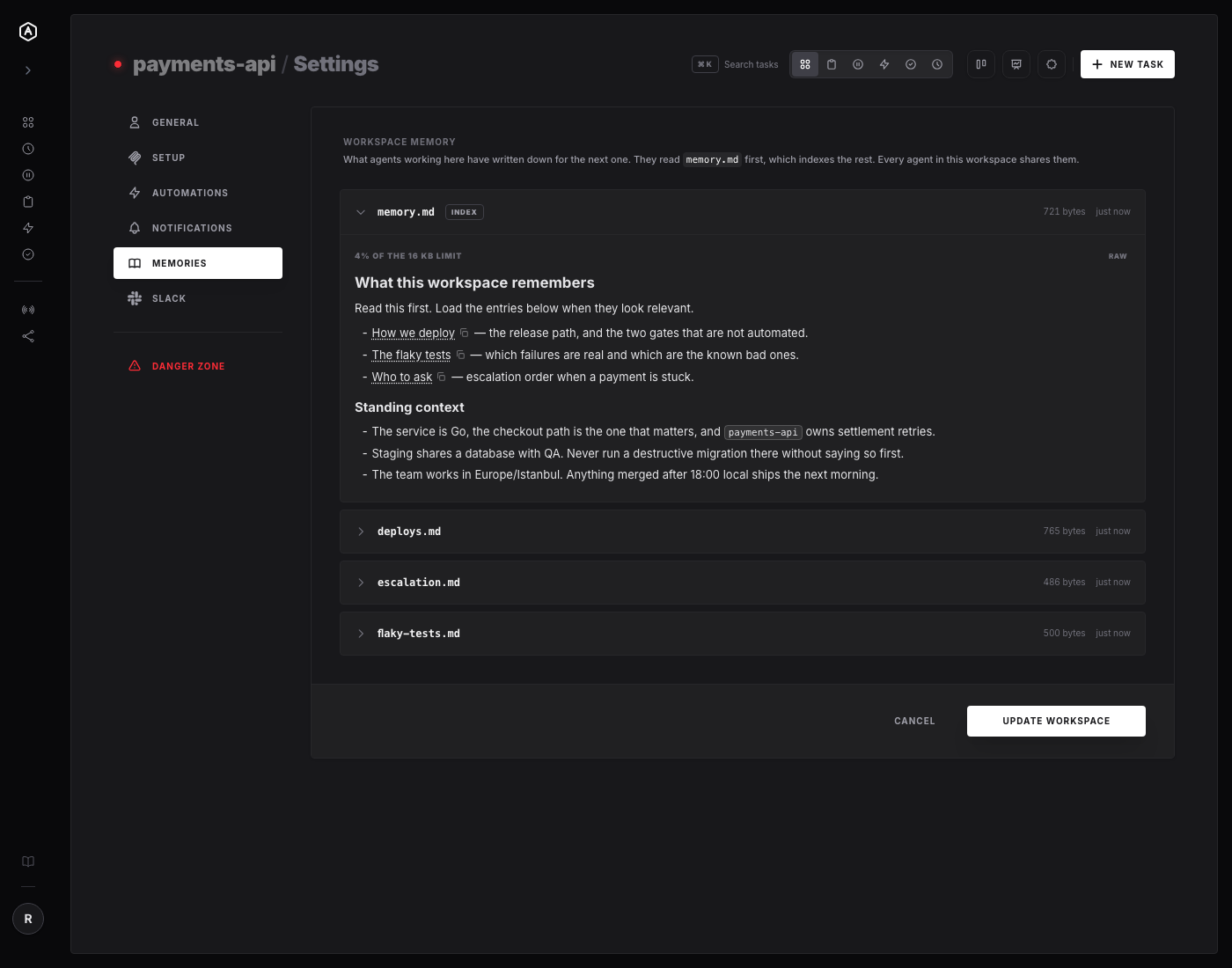
Everything in that screenshot was written by an agent through saveMemory, and read back by the same API the settings screen uses. Nobody typed it into a form.
One Note Becomes a Library
A single memory file rots the way a single README rots: it grows until nobody reads the whole thing, and the useful part is buried in the middle.
So memory.md is an index. It stays short, and it points at named memories — deploys.md, flaky-tests.md, escalation.md — using memory:// links. An agent starting a task reads the index, sees which entries look relevant to what it's about to do, and loads only those.
Those links are real links. Click one in the settings screen and it opens that memory:
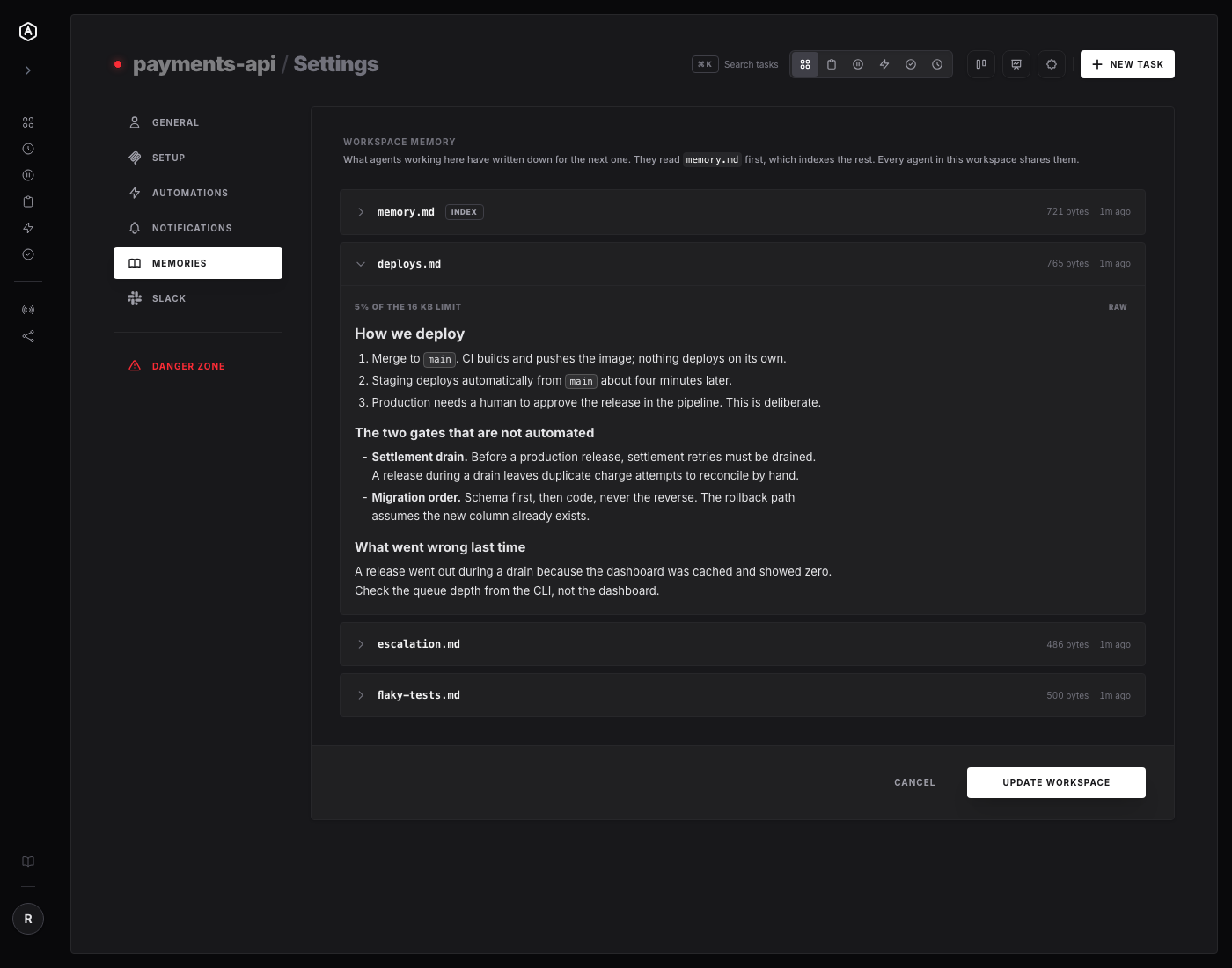
The nice part is what this does to the shape of the knowledge. Instead of one file that everything gets appended to, you get something closer to a small internal wiki that the agents maintain themselves — and that you can read at a glance, top to bottom, and correct if it drifts.
Why This Actually Changes Things
You can switch agents without starting over. Claude for this task, Gemini for that one, Codex when it suits — the memory sits in the workspace, not in the agent. Changing providers stops costing you your accumulated context, which means you can pick the best tool for a job instead of the one that already knows things.
Several agents stop repeating each other's homework. Two agents working the same workspace share one set of notes. What the first one learned the hard way at 11pm is what the second one starts with. You stop being the message bus between your own agents.
Any machine, no setup. Laptop, office box, CI runner, a scheduled task firing at 3am — they all connect to the same workspace and see the same memory. Nothing to sync, nothing to copy, no file that only exists in one place.
You can read what your agents believe. The Memories tab in workspace settings shows every note, its size, and when it last changed. That's the difference between hoping an agent has good context and being able to check — and when something in there is wrong, you can see it before it costs you a release.
And it compounds. This is the part worth sitting with. Every task an agent finishes can leave the workspace slightly smarter than it found it. Month three genuinely doesn't look like day one — not because the model changed, but because the workspace accumulated the specific, unglamorous, hard-won details of how your work actually works. We wrote about that loop as an idea a while back. This is the mechanism it needed.
What It Deliberately Isn't
Being straight about the edges, because overselling memory is a genre:
- → It isn't a vector database or semantic search. These are notes an agent chooses to write and chooses to read, indexed by a file it maintains by hand. That's it. The simplicity is the point — you can read the whole thing.
- → It isn't automatic. Nothing is captured behind the agent's back. It decides what's worth remembering and writes it, the way a person keeps notes.
- → The interface is read-only. You can read every memory in settings, but you can't edit one there. A human quietly rewriting a note under an agent that already read it is a confusing failure from both directions, so writing stays with the tools.
- → There are limits, and they refuse rather than truncate. One memory holds 16 KiB; a larger one is rejected with a message telling the agent to split it and index the parts. Names are lowercase slugs ending in
.md, up to 32 characters. An agent told its note is too big can decide what to drop — one silently cut in half can't. - → Memory doesn't cross workspaces. Each memory is keyed to the workspace and its owner, and the scoping is bound when the tools are wired up, so an agent can only ever name a memory inside the workspace it's connected to. Your payments workspace can't read your client work.
Where to Look
It shipped in v0.5.10 across three PRs: #457 for the storage, #458 for the loadMemory and saveMemory tools, and #462 for the read API, the settings tab, and memory:// links. The tools themselves are in backend/internal/controller/mcp/memory.go.
If you already have an agent connected to a workspace, it has the tools now. Ask it what the workspace remembers.
---
AgentRQ is currently in public beta. Join our GitHub community to help shape the future of human-agent collaboration.